
If you are a UiTM student in Malaysia, chances are you rely on uFuture UiTM for almost everything from lecture notes to assignments and online assessments. Yet, many students still feel confused, especially in their first semester, about how uFuture works and how it differs from other education platforms like IDMe KPM.
Based on my first-hand experience using uFuture UiTM, this guide will walk you through everything you need to know clearly and practically. By the end of this article, you’ll understand how to use uFuture confidently and avoid common mistakes that often affect academic performance.
What Is uFuture UiTM?
uFuture UiTM is the official Learning Management System (LMS) of Universiti Teknologi MARA (UiTM). It is built on the Moodle framework and acts as the central digital learning platform for UiTM students and lecturers.
In simple terms, uFuture UiTM is the online classroom for UiTM students.
Through uFuture, students can:
- Access lecture notes and learning materials
- Submit assignments
- Attempt quizzes and online tests
- Receive announcements from lecturers
- Communicate through discussion forums
Without access to uFuture UiTM, managing academic tasks becomes extremely difficult.
Why uFuture UiTM Is Important for Students
uFuture UiTM is not optional. Most faculties use it as the main platform for teaching and assessment.
From my experience, students who regularly check uFuture:
- Stay updated with announcements
- Submit assignments on time
- Avoid unnecessary penalties
On the other hand, ignoring uFuture often leads to missed deadlines, zero marks for assignments, and confusion about coursework.
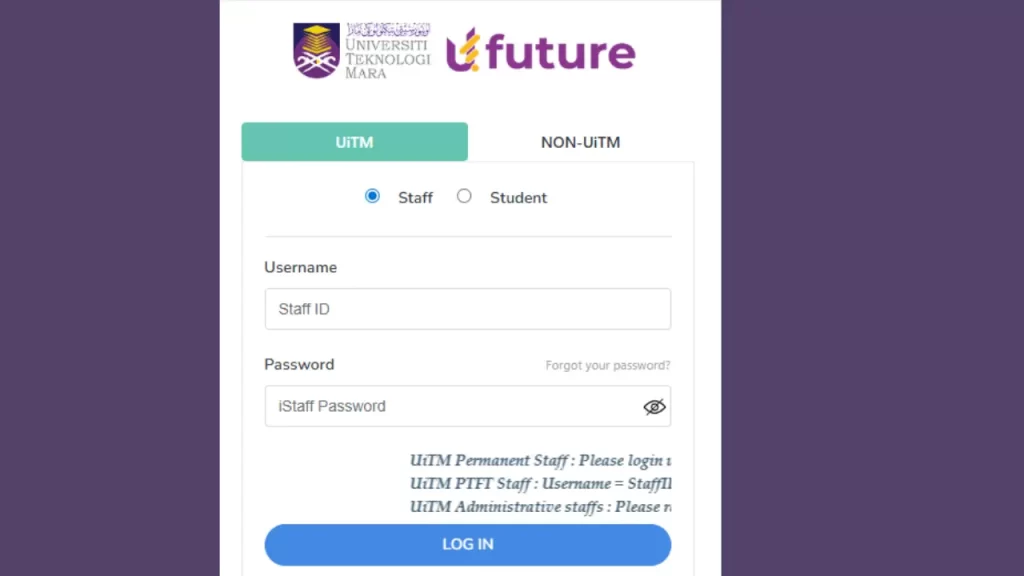
How to Login to uFuture UiTM
Official uFuture UiTM Website
Step-by-Step Login Process
- Visit the official uFuture website
- Click on the Login button
- Enter your UiTM Student ID
- Use the same password as your UiTM student portal
- Click Log in
If your details are correct, you will be redirected to your uFuture dashboard.
First-Time Login Experience
During my first login, no courses appeared on the dashboard. This made me think there was an issue with my account. However, this is a common situation for new students.
Usually, the system takes 24 to 48 hours to sync registered subjects. This delay is normal and does not indicate an error.
Understanding the uFuture UiTM Dashboard
Once logged in, you will see several important sections:
My Courses
Displays all subjects you are registered for in the current semester.
Announcements
Contains important messages, deadlines, and updates from lecturers.
Calendar
Shows assignment deadlines, quizzes, and scheduled activities.
Recent Activity
Tracks submissions and course updates.
Checking announcements regularly is essential, as many lecturers rely solely on this section for communication.
Main Features of uFuture UiTM
Learning Materials
Lecturers upload course materials such as:
- PDF notes
- PowerPoint slides
- Recorded lectures
- Reading resources
All materials can be accessed anytime.
Assignment Submission
uFuture allows students to submit:
- Individual assignments
- Group assignments
- File uploads and online text submissions
Late submissions are usually blocked automatically, so submitting early is recommended.
Quizzes and Online Tests
uFuture supports:
- Timed quizzes
- Multiple-choice questions
- Short-answer assessments
A stable internet connection is crucial during quizzes to avoid disruptions.
Discussion Forums
Forums are used for academic discussions, questions, and lecturer feedback. In some courses, participation may contribute to marks.
Attendance and Activity Tracking
Some lecturers use uFuture to monitor attendance and student activity. Login history and submission timestamps can be viewed by lecturers.
IDMe KPM vs uFuture UiTM Comparison
Many students confuse IDMe KPM with uFuture UiTM. The table below clearly explains the difference.
| Feature | IDMe KPM | uFuture UiTM |
| Purpose | Digital identity and access system | Online learning platform |
| Managed By | Ministry of Education (KPM) | Universiti Teknologi MARA |
| User Type | School students, teachers, parents | UiTM students and lecturers |
| Main Function | Single sign-on verification | Courses, assignments, quizzes |
| Learning Content | No | Yes |
| Assignment Submission | No | Yes |
| Required for UiTM Students | No | Yes |
UiTM students do not need IDMe KPM to access or use uFuture UiTM.
Common uFuture UiTM Problems and Solutions
Cannot Login
Possible causes include incorrect password, inactive account, or system maintenance. Resetting the password through the UiTM portal usually resolves the issue.
Courses Not Showing
This may happen due to late registration, unpublished courses, or system delays. Waiting 24 to 48 hours or contacting the lecturer is recommended.
Assignment Upload Failed
This often occurs due to large file sizes, unsupported formats, or expired deadlines. Compressing files and submitting early can prevent this issue.
Using uFuture UiTM on Mobile Devices
uFuture UiTM works on mobile browsers, but the experience is limited.
Mobile devices are suitable for:
- Reading announcements
- Viewing notes
However, laptops or desktops are recommended for quizzes, exams, and large file uploads.
Best Practices for Using uFuture UiTM
Based on real usage, the following habits are highly recommended:
- Log in daily
- Enable email notifications
- Keep proof of submissions
- Avoid last-minute uploads
- Read all announcements carefully
These practices help prevent academic issues and unnecessary stress.
FAQs About uFuture UiTM
Is uFuture UiTM compulsory?
Yes. Most courses require uFuture for assignments, assessments, and communication.
Is uFuture UiTM free?
Yes. It is officially provided by UiTM for registered students.
Why is my uFuture account inactive?
This may be due to registration issues, unpaid fees, or system delays.
Can lecturers track student activity?
Yes. Login activity and submission records are visible to lecturers.
Conclusion
uFuture UiTM is the core digital learning platform for UiTM students. While it may feel overwhelming at first, understanding how the system works can greatly improve your academic experience.
From my own experience, students who use uFuture consistently stay more organized, meet deadlines, and avoid common academic problems. Treat uFuture as a daily academic tool, and it will support you throughout your studies at UiTM.